Chiron Debug View
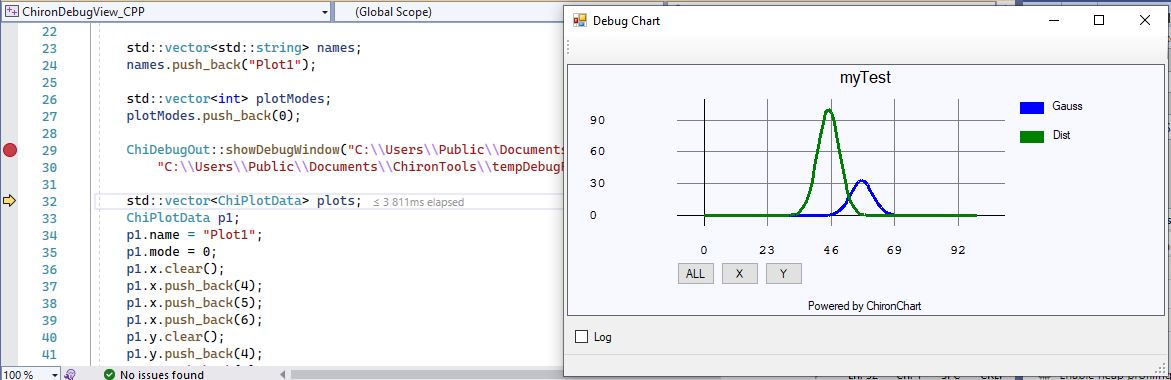
An easy debug chart view for C++ and C#!
Available from NuGet or directly here:
Nuget Use the ChironDebugView_CPP.cpp and Program.cs as an example. The "ChironDebugView.exe" is the application which shows the data. Note that you need the absolute path to this file! For the examples below assume the path is "C:\\Users\\Public\\Documents\\ChironTools\\ChironDebugView.exe", but you can replace this by some other folder ("packages\\...", e.g.)C++ Usage
In the CPP folder you find the "ChiDebugOut.h" file where the ChiDebugOut class is defined. Add this header to your C++ project.
The "ChironDebugView_CPP.cpp" file is an example how to use the "ChiDebugOut::showDebugWindow" function:
// ChironDebugView_CPP.cpp : This file contains the 'main' function. Program execution begins and ends there.
//
#include
C# Usage

In the NET folder you find the "ChiDebugOut.cs" file where the ChiDebugOut class is defined. Add this file to your C# project.
The "Program.cs" file is an example how to use the "ChironDebugView_NET.ChiDebugOut.showDebugWindow" function:
using System;
using System.Collections.Generic;
using System.Diagnostics;
using System.Linq;
using System.Text;
namespace ChironDebugView_NET
{
internal class Program
{
static double gauss(double x, double a, double b, double c)
{
var v1 = (x - b);
var v2 = (v1 * v1) / (2 * (c * c));
var v3 = a * Math.Exp(-v2);
return v3;
}
static void Main(string[] args)
{
int num = 100;
float delta = 100.0f / num;
List
Donation
Send us an email if you need help or have some suggestions:
t.office@gmx.netIf you want to support our developement, you can donate here: